
本文仅为提供国内下载转入并未对软件做任何修改,文章大部分内容来自官方网页:https://romprovider.com/rom2box-download/
本文仅为提供国内下载转入并未对软件做任何修改,文章大部分内容来自官方网页:https://romprovider.com/rom2box-download/
软件简介:
官方网站:https://romprovider.com/
ROM2Box是由ROMProvider创建的智能手机修复软件。COM,通过使用这个工具,您可以修复许多
智能手机免费,无需任何认证。该工具支持QCOM,联发科&展讯智能手机包括许多从Oppo下载禁用
手机,Vivo,小米和Realme。
ROM2box的特点:
| 机器翻译 | 原文 | ||
| 特点 | 现况 | Features | Status |
| MTK验证绕过 | 是的 | MTK Auth Bypass | Yes |
| MTK FRP旁路 | 是的 | MTK FRP bypass | Yes |
| MTK模式用户锁绕过 | 是的 | MTK Pattern userlock bypass | yes |
| MTK闪存单分区 | 是的 | MTK Flash Single partition | yes |
| MTK全闪存 | 是的 | MTK full flash | yes |
| MTK读取完整固件和分区 | 是的 | MTK Read Full Firmware & Partitions | Yes |
| MTK准备SP固件工具 | 使用7zip解压 | MTK Prepare Firmware for SP tool | extract using 7zip |
| MTK解锁/重新锁定引导加载程序 | 是的 | MTK unlock/Relock bootloader | yes |
| QCOM读取固件 | 是的 | QCOM Read Firmware | yes |
| QCOM闪存固件 | 是的 | QCOM flash firmware | yes |
| QCOM旁路FRP | 是的 | QCOM bypass FRP | Yes |
| QCOM绕过Mi帐户 | 是的 | QCOM bypass Mi account | Yes |
| QCOM旁路模式 | 是的 | QCOM bypass pattern | yes |
| MTK绕过Mi帐户 | 是的 | MTK bypass Mi account | Yes |
| QCOM修复IMEI | 可以但不包括 | QCOM Repair IMEI | it can but Not Included |
| MTK修复IMEI | 可以但不包括 | MTK Repair IMEI | it can but Not Included |
| MTK SP闪存工具 | 是的 | MTK SP Flash tool | Yes |
| 包含驱动程序 | 没有 | Driver Included | No |
| 展讯闪存 | 是的 | Spreadtrum flash | Yes |
| 展讯读取 | 没有 | Spreadtrum Read | No |
| 展讯玻璃钢 | 否(下次更新时) | Spreadtrum FRP | No (in next update) |
| 三星玻璃钢 | 是的 | Samsung FRP | Yes |
| 三星闪存 | 是的 | Samsung Flash | Yes |
| 三星 Odin | 是的 | Samaung Odin | Yes |
| 下载代理程序包 | 添加4GB 1000+设备 | Download agent package | Addition 4GB 1000+devices |
| 小米QCOM | 79+部智能手机 | XIAOMI QCOM | 79+ smartphones |
| Vivo QCOM | 超过25部智能手机 | Vivo QCOM | 25+ smartphones |
| Oppo QCOM | 51+部智能手机 | Oppo QCOM | 51+ smartphones |
| 小米MTK | 所有(不包括新) | Xiaomi MTK | ALL (excluding new) |
| Vivo MTK | 所有(不包括新) | VIVO MTK | ALL (excluding new) |
| Oppo QCOM | 所有(不包括新) | Oppo QCOM | ALL (excluding new) |
| 其他MTK | 全部 | Other MTK | ALL |
| ADB接口 | 是的 | ADB Interface | Yes |
| 快速启动接口 | 是的 | Fastboot Interface | Yes |
| 引导加载程序解锁 | 3通用方法 + MTK方法 | bootloader unlock | 3 Generic Method + MTK Method |
| 快速启动到EDL | 3方法 | fastboot to EDL | 3 method |
| 快速启动闪存 | 是的 | fastboot flash | Yes |
| 发射闪光 | MTK客户端、SP下载(MI)和SP工具 | Scatter Flash | MTK Client, SP Download (MI) and SP tool |
| Moto空白闪光灯 | 是的 | Moto blank Flash | Yes |
| 除泡器 | oppo/vivo/三星/小米的通用脚本 | bloatware remover | universal script for oppo/vivo/samsung/xiaomi |
| APK安装程序 | 是的 | APK Installer | Yes |
| 快速启动闪光器 | 是的 | fastboot flasher | Yes |
| GSI闪光器 | 系统映像(包括空白vbmeta) | GSI Flasher | system image (blank vbmeta included) |
| PAC取出器 | 是的 | Pac Extractor | Yes |
| PAC闪存器 | 升级下载 | Pac flasher | upgrade download |
| 自由 | 是的 | free | yes |
| 源代码 | 可供下载 | Source code | available for download |
下面为官网原文:
Changes in V3.2:
- Added demo remove adb
- added vivo demo remove adb
- added vivo MTK MT6765 crash BROM
- added samsung *#0*# frp New Security
- added ADB root Read Firmware, partition manager
- Support added Vivo MTK Y02s, Y16 > FRP, Reset
- Xiaomi Sideload added following model: poco f3, mi 11x, note 9 pro, poco x3, poco x3 nfc, note 10 pro max, note 11,
note 10 pro, note 11s, note 9s, mi 11t, redmi k20, mi 10 5g, Note 9s, 9 pro max - Red magic 6/ 6 pro > full dump, Firmware Flash
- axon 10 pro > full dump, Firmware Flash
- Oppo A11/ A11x > full dump, Firmware Flash, read, frp, reset
- Oppo A5-A9 > full dump, Firmware Flash, read, frp, reset
- Oppo A52-A72 > full dump, Firmware Flash, read, frp, reset
- fix motorola boot repair
- Mediatek Auto Mod Support for Following Models >
aligator_s6500, AT&T Calypso U318AA, Infinix hot 20, hot 20 5g, hot 20i, hot 20s, Alcatel 1V 2021,
AGM H5, H5 Pro, ALL Call S10, All Do Cute iNote, Bphone A85 5G, Bphone A60, Bphone A50, Bphone A40
if You wish to flash the Firmware from Sideload, use this Program
Note:
- Run Install.bat & type yes to replace old files
- must wipe userdata after flashing Mediatek firmware
- if any bootloop after flashing, Just write preloader (which is dumped on every MTK function)
- for Oppo/Realme flashing delete all partition from firmware folder Include Name ‘Oppo’
Installation:
- Portable, Just extract
- Run Install.bat to replace old files in temp
- updates- Extract update file in Main directory and overwrite all
Require USB Driver:
Read MTK Firmware:
- there are 2 options to Read Firmware, First flash.bin and other Partitions
Steps:
- connect phone in VCOM/BROM Mod, Go to Mediatek/Firmware reader and Click desire button (flash.bin take huge time to read userdata partition, Partition option does not read userdata it will take just 15minut)
Steps:
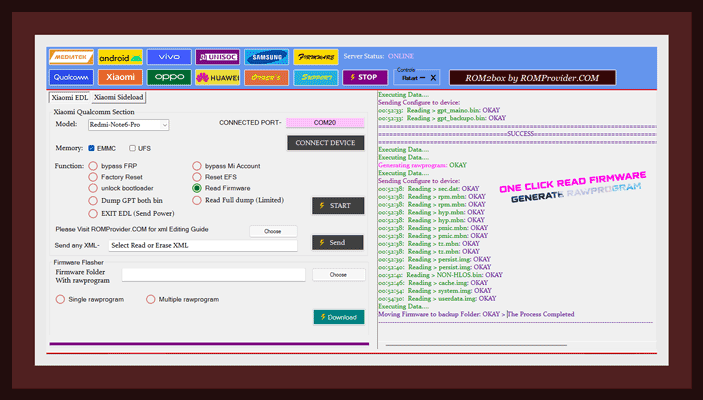
- Go to QCOM/Firmware Reader Select Firehose, Select USB COM and Click Read.
Note:
- for UFS devices use send xml option instead displayed option in older section bcz it will not work on some devices, xml already included for newer Phone in New section. if don’t have a xml just read gpt and parse it.. & most important read qcn from qcom/other before doing anything
- userdata partition will be skipped (it will take huge time so removed from reading script)
- any partition contain number like keymaster1 can’t be readed ( you can manually read that type of partitions- Go to ROM2box/qcom edit parttable file and add all the partition that contain a number from parttablex file once done run read.exe for emmc and readu.exe for ufs (make sure you have read the full firmware via ROM2box before using this process)
MI Account bypass:
- Go to Xiaomi select your device, connect phone to computer (short test point) wait for device detection once COM detected click bypass MI account/persist
QCOM FRP bypass:
- Go to QCOM select firehose, connect phone to computer (short test point) wait for device detection once COM detected click ‘bypass FRP’
QCOM Pattern bypass:
- Go to QCOM select firehose, connect phone to computer (short test point) wait for device detection once COM detected click ‘Reset/userlock bypass’
Vivo Pattern bypass:
- Go to Vivo select device, connect phone to computer (short test point) wait for device detection once COM detected click ‘Reset/userlock bypass’
Oppo Pattern bypass:
- Go to Oppo select device, connect phone to computer (short test point) wait for device detection once COM detected click ‘Reset/userlock bypass’
Huawei ID bypass:
- Go to Huawei select device, connect phone to computer (short test point) wait for device detection once COM detected click ‘ID bypass’ (experimental and not work on many model)
unsupported QCOM devices Testing with No Auth Firehose:
- Go to QCOM/Experiment tab select for suitable Programmer (more then 450+ patched firehose added) connect phone to computer (short test point) wait for device detection once COM detected Run the function you want..
MTK Disable Auth:
- Go to Mediatek/main tab mark ‘disable auth‘ click ‘start‘ button
Mediatek unlock bootloader:
- Go to Mediatek/service/bootloader unlock
QCOM Disable Auth:
- all Included devices pre patched
Flash QCOM Firmware:
- got to qcom/firmware flasher load xml & programmer file from firmware folder
- connect phone in edl mod, once device detected click start button
Flash Mediatek Scatter Firmware:
- go to mediatek main tab and select disable auth follow instructions
- then go to mediatek/sp-flash-tools tab load scatter file, load da file, load auth file and click ‘Download’ button Now connect phone to computer (Press volume up + volume – & insert usb cable)
Flash Scatter Firmware Via Fastboot:
- extract firmware to main tool folder (must require) run rom2box.exe go to Mediatek/SP flash tools/ fastboot scatter flasher/ locate scatter file, connect phone in fastboot mod and click ‘START’ button, make sure bootloader is unlocked
- tested only on ‘A ‘Only (single slot) device..
Samsung FRP:
- tested from android 7.1 to 12.1 and working (support almost all samsung phones)
Vivo MTK:
- BROM is disabled on on newer Vivo Phone, test point is require to detect the phone
Oppo MTK:
- FRP, Read, Flash, unlock reset working
OnePlus QCOM:
- unable to flash oneplus 10 pro, flashing works on Oneplus X, Nord N20 5G
Oppo QCOM
- test Point require to detect Phone in EDL,
- this Method works on many new Model: Go into the recovery (volume down + power button) connect to the PC and click several times on the text of the recovery version at the bottom of the screen
- working: FRP, Reset, Read, Flash
Realme QCOM:
- working: FRP, Reset, Read, Flash
Realme MTK
- working: FRP, Reset, Read, Flash
Xiaomi QCOM & MTK:
- Read, Flash, unlock working on both qcom and MTK Phones
Other MTK :
- support MT6580 & Newer CPU
Other:
- try yourself
Credit:
- MTK Client from B.Kerler
- Platform tools from Google
- Android LIB from Regaw@XDA
- Spreadtrumn tools from unisoc
- SP Flash tools from Mediatek
- compile & GUI by ROMProvider.COM
Screenshot: high quality: here
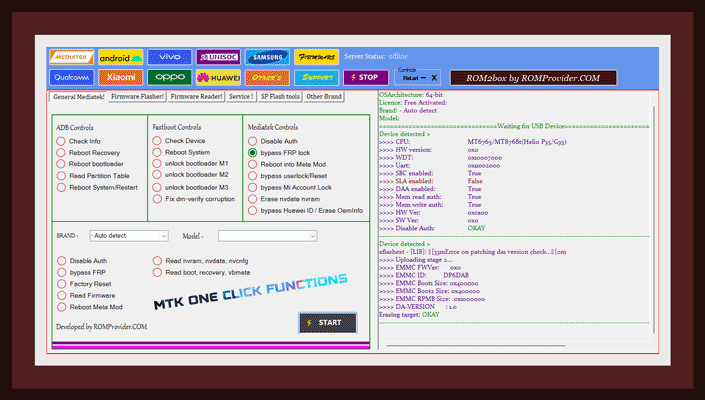
One Click MTK Functions:
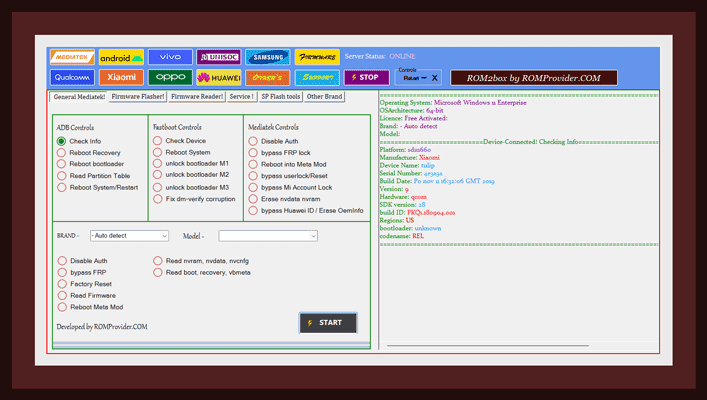
One Click ADB Functions:
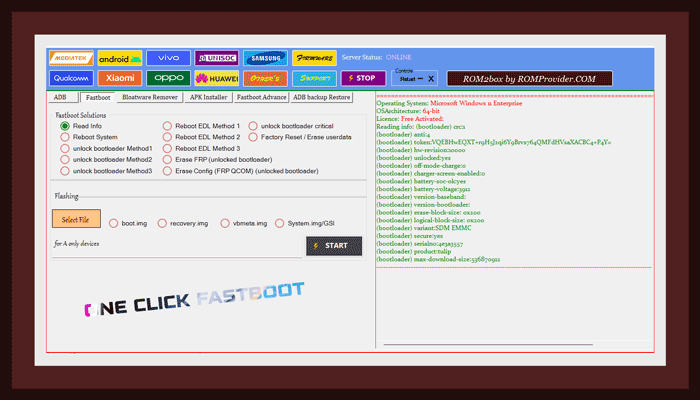
One Click Fastboot Functions:
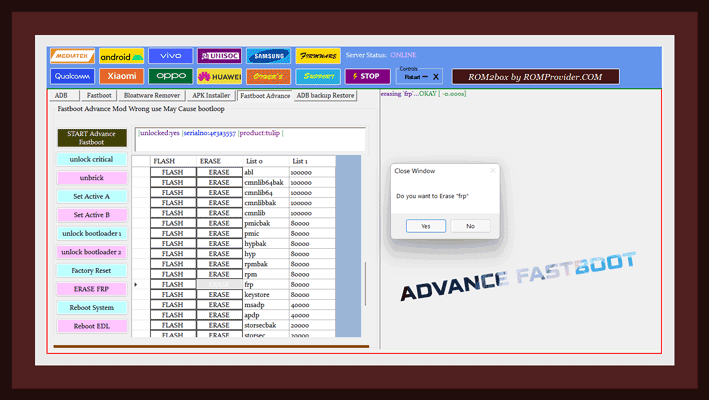
Advance Fastboot Mod:
One Click Read Firmware create rawprogram:
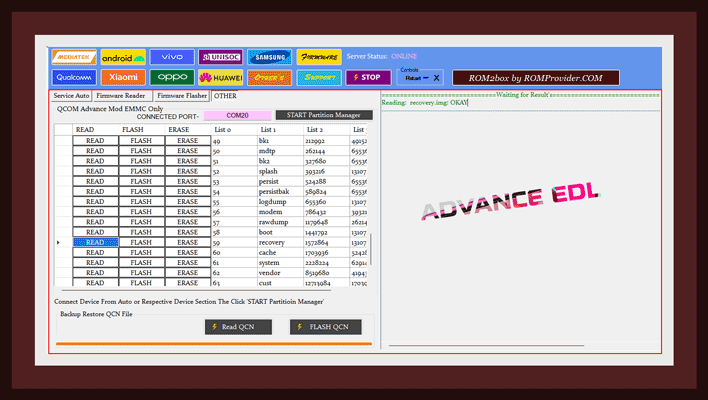
Advance EDL Mod for Expert’s:
One Click fastboot fix bootloop caused by root & custom rom:

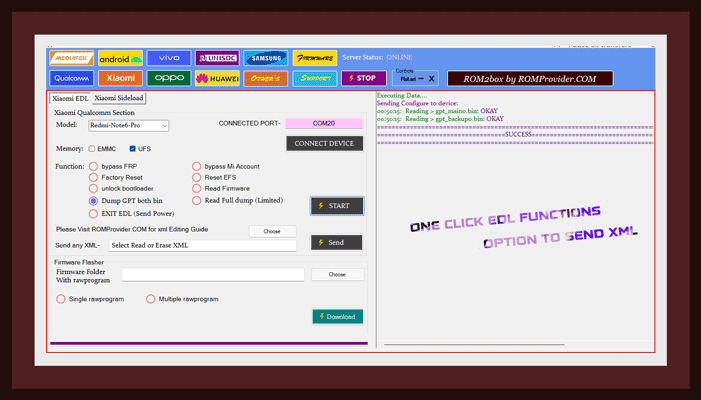
One Click EDL for faster Operations:
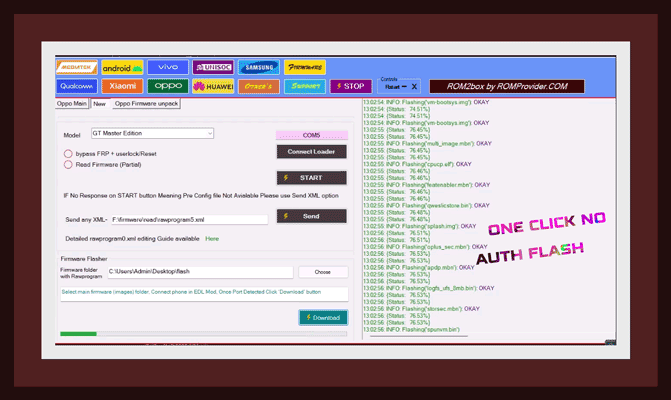
One Click No auth Flash Via EDL:
官方下载链接:
- 软件介绍页:https://romprovider.com/rom2box-download/
- ROM2box V3.2全免费Win 64位: telegram-Main/ Mirror 【均需出国,后文给出百度/腾龙网盘下载链接】
- 浏览已确认的支持型号::Oppo, Realme, Vivo, Xiaomi
- 设置显示为100%,你可以增加字体大小而不是缩放
百度/腾龙网盘下载链接:
- 百度网盘:
- 链接: https://pan.baidu.com/s/1QPVZsajMTrDJbtf8zgKkIg?pwd=txk8
- 提取码: txk8
- 腾龙网盘:暂无
温馨提示:本站完全免费!所有资源均收集自互联网,分享目的仅供学习参考!资源版权归该资源的合法拥有者所有,请您在下载后24小时内删除。若本站发布的内容侵犯到您的合法权益,请立即联系 admin@tenlonstudio.com 及时做删除处理!

厉害
请问楼主,这个程序可以刷没有解锁的华为手机不?
在工具的华为工具界面中存在清除ID的选项,但是我没有华为的手机,所以没去实际使用过